
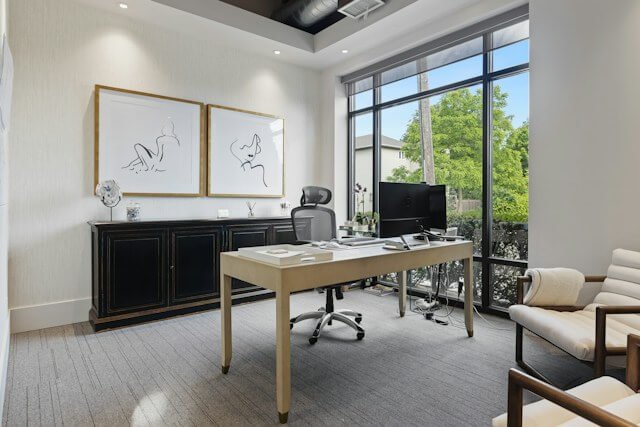
A well-designed executive home office supports concentrated work, clear thinking, and professional conversations without feeling cold or corporate. Every decision should respond to the way you use the room, from the position of your desk to the placement of task lighting. Start with the practical needs of your workday, then build a calm visual scheme around them. The result should feel comfortable during a full afternoon of focused work and polished enough for an unexpected video meeting.
Purpose-Driven Room Layouts
Place your desk where you can see the door without sitting directly in a busy walkway. This position limits background movement and creates a composed setting for video calls. If possible, keep the monitor perpendicular to the nearest window so daylight won’t produce glare across the screen.
Divide the remaining space according to specific activities. A compact table can handle document reviews or informal meetings, while a nearby armchair creates a separate spot for reading. Leave at least 36 inches behind your chair so you can move comfortably. Frequently used files, chargers, and notebooks should sit within arm’s reach, while archive storage can occupy less accessible cabinets. Test the layout for a full workday before ordering large furniture.
Layered Illumination to Fight Eye Fatigue
Plan three levels of light: general illumination for the room, focused light for the desk, and softer accent lighting for visual comfort. Decorative options such as brass wall lighting by Corston can add warm background light while coordinating with switches, handles, and other metal details.
Avoid relying on one bright ceiling fixture. Common home office lighting mistakes include poor fixture placement and unmanaged screen glare. A movable desk lamp lets you direct light across papers without shining it into your eyes. Designing the room to reduce screen glare and visual strain can also make long work sessions more comfortable. During extended periods at the computer, follow the 20-20-20 habit: every 20 minutes, look about 20 feet away for 20 seconds.
Selecting Tactile Finishes That Last
Choose materials that feel pleasant during daily use and can tolerate repeated contact. A solid wood desk develops character over time, while a high-quality veneer offers a similar visual effect at a lower cost. For the chair, tightly woven wool blends and durable performance fabrics usually handle regular use better than delicate upholstery.
Keep metal finishes consistent across cabinet pulls, door hardware, and electrical details. They don’t need to match every decorative object, but repeating one main finish gives the office a deliberate look. Matte surfaces are useful around the desk because they reflect less light and show fewer fingerprints. Before committing to paint, flooring, or fabric, view samples beside the window in the morning and evening. Colors can shift noticeably as natural light changes.
Eliminating Clutter for Mental Clarity
Give every recurring item a fixed home close to where you use it. A shallow drawer can hold charging cables and adapters, while one desktop tray can contain papers that need attention that day. Documents without an immediate purpose should move into labeled folders or a closed cabinet.
Digital clutter deserves the same attention. Keep active project files in a simple folder structure, clear the desktop at the end of each week, and remove notifications that interrupt focused work. A five-minute closing routine helps maintain the system: return supplies, file loose papers, and write tomorrow’s top three priorities. Leave some surfaces empty. Clear space around the monitor and one uncluttered shelf give the eye places to rest during demanding tasks.
An executive office works best when its most-used features require almost no thought. Sit at the desk after the room is arranged and notice what interrupts you during the first hour. A lamp that needs repositioning, a cable crossing your feet, or a file stored too far away will reveal the final adjustments the room needs.

